Magic Marker Font for Bold, Playful Campaign Graphics
It was 3 p.m. on a Tuesday — two days before the launch of a summer DIY course series — and I was tweaking the final Instagram carousel post. The headline needed to pop instantly in a fast-scrolling feed: “Make It Yours: Handmade Summer Starts June 10.” I tried three fonts already. One felt too corporate. Another got lost against the textured background. Then I dropped in Magic Marker, typed the headline, and paused. Not because it looked flashy — but because it *felt* right: warm, intentional, and unmistakably human. That’s when I knew Magic Marker wasn’t just another display font — it was a campaign collaborator.
Magic Marker for Custom Designs That Feel Hand-Crafted
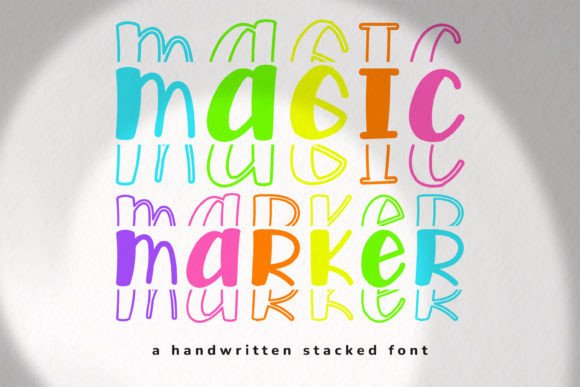
Magic Marker is a display font with unmistakable personality: rounded terminals, gentle contrast, and subtle ink-like variation that mimics real marker strokes — not cartoonish, not stiff, but alive with quiet confidence. As a fonts choice for custom designs, it bridges craft authenticity and digital polish. I used it for workshop labels, printable checklists, and even SVG cut files for vinyl stickers — all while keeping visual consistency across Canva templates, PDF downloads, and printed handouts. Because it’s built as a display font, it thrives at medium-to-large sizes (24pt and up), where its organic flow shines without sacrificing clarity. Just avoid scaling it below 16pt on screen — the fine details soften, and legibility dips in tight layouts like email footers or mobile app buttons.
Magic Marker for DIY Crafts and Social Media Templates
When building a Pinterest campaign around seasonal DIY crafts — think “Sunset Terracotta Planters” or “Stenciled Linen Napkins” — Magic Marker became my go-to for title overlays on lifestyle photos. Its friendly, approachable energy aligns perfectly with maker audiences who value authenticity over perfection. On Pinterest pins, it held up beautifully against busy backgrounds (like woven baskets or sunlit workbenches) thanks to its generous x-height and open counters. For Instagram Reels covers, I paired it with a clean sans serif (Inter Light) for subtitles — Magic Marker handled the main hook (“Try This in 5 Minutes”), while the sans serif anchored supporting text. No ligatures or stylistic alternates are included, so don’t expect swashes or flourishes — but that’s part of its strength. It’s focused, consistent, and ready for rapid iteration across template packs.
Magic Marker for YouTube Thumbnails and Fast-Scrolling Feeds
You only get ~0.8 seconds to register a YouTube thumbnail before the scroll. That’s why I tested Magic Marker across six thumbnail variations for a “Beginner Watercolor Tips” video series. On light backgrounds, it popped with soft contrast — no stroke outlines needed. On dark overlays, I added a subtle white stroke (1px) in editing software, and it retained warmth without looking harsh. Crucially, it remained readable at thumbnail scale (1280×720 px) when used for 3–5 word headlines — “Mix Like a Pro,” “Wet-on-Wet Magic,” “No Brushes? No Problem.” But I quickly learned: skip long phrases or stacked lines. Magic Marker isn’t built for paragraph text or dense captions. It’s a display font — purpose-built for impact, not exposition.
Magic Marker for Elegant Branding and Minimalist Promo Graphics
“Elegant” might surprise you — after all, Magic Marker is described as an incredibly cool font for DIY crafts and custom designs. But elegance here isn’t about formality; it’s about restraint, rhythm, and intention. When layered over muted linen textures or soft gradient banners for a webinar series on mindful making, Magic Marker brought quiet sophistication — not flash, but presence. Paired with a refined serif (Cormorant Garamond Regular) for body copy, it created a balanced typographic system: expressive yet grounded, playful yet trustworthy. For online shop campaigns — like limited-edition printable kits — it worked beautifully on product badges (“New,” “Best Seller,” “Instant Download”) without overwhelming the imagery. Just confirm your license covers commercial use before dropping it into client-facing assets or digital product bundles.
Magic Marker for Branded Templates and Consistent Campaign Identity
I built a 12-piece Instagram Story template pack using Magic Marker as the sole display font — no exceptions. Why? Because consistency across touchpoints matters more than variety when establishing recognition. Followers began associating that soft, confident letterform with our “Make With Me” content series. In practice, that meant using Magic Marker only for headers, quote callouts, and section dividers — never for body text, captions, or CTAs like “Swipe Up.” For those, I stuck with a neutral sans serif (Manrope Medium). The result? A cohesive visual voice that felt handmade but professionally executed. Bonus: the font file is lightweight (TTF format), loads reliably in design tools, and renders cleanly across Figma, Adobe Creative Cloud, and Canva — no rendering hiccups on export.
If you’re selecting fonts for campaigns where warmth, approachability, and handmade charm matter — whether for a small business launch, educator content series, or craft brand refresh — Magic Marker delivers exactly what its description promises: an incredibly cool font that adds a lovely touch. It’s not for every situation — skip it for legal disclaimers, data dashboards, or formal investor decks — but for custom designs, DIY crafts, and any creation that benefits from genuine, human-centered expression? It’s an amazing choice.